Asalamu-Alaikum wa Rahmatullahi wa Barakatuh,...
Showing posts with label free. Show all posts

Friday, 5 December 2014

FREECHARGE recharge coupon | 50% OFF. on RECHARGES | HURRY!!!

NO SURVEYS | NO BLOCKS| NO POPUPS| Get your recharge done for FREE

  "FREECHARGE recharge coupon code here;;;;;

follow steps below :
 1.Download freecharge app
 2.log in or sign up.
 3.Enter all details to recharge any number
 4.In payment page go to bottom and check the box "Have a freefund code".
 5.Enter code  "RRPKL85"  or "RJNPB4P"


        To use again and again, create new account each time , Unistall and Reinstall your app and use


        "Any problem occurs or not able to get discount please comment below"


Best regards,
Here goes the code of the element you want to show

Friday, 11 July 2014

Download Free Microsoft NET.Framework

The .NET Framework is Microsoft's comprehensive and consistent programming model for building applications that have visually stunning user experiences, seamless and secure communication, and the ability to model a range of business processes.
The Microsoft .NET Framework 4 redistributable package installs the .NET Framework runtime and associated files that are required to run and develop applications to target the .NET Framework 4.


The .NET Framework 4 works side by side with older Framework versions. Applications that are based on earlier versions of the Framework will continue to run on the version targeted by default.
.NET Framework 4 includes the following new features and improvements:
  • Improvements in CLR and BCL
  • Improvements in ADO.NET
  • Enhancements to ASP.NET


  • Improvements in Windows Presentation Foundation
  • Improvements to Windows Workflow Foundation and Windows Communication Foundation
  • SYSTEM REQUIREMENTS :

      Supported Operating System

    Windows 7 Service Pack 1, Windows Server 2008 R2 SP1, Windows Server 2008 Service Pack 2, Windows Vista Service Pack 2
        • Windows Vista SP2 (x86 and x64)
        • Windows 7 SP1 (x86 and x64)
        • Windows Server 2008 R2 SP1 (x64)
        • Windows Server 2008 SP2 (x86 and x64)
      • Hardware Requirements:
        • 1 GHz or faster processor
        • 512 MB of RAM
        • 850 MB of available hard disk space (x86)
        • 2 GB hard drive (x64)

     INSTALLATION NOTE :

      Note: Windows 8 and Windows Server 2012 include the .NET Framework 4.5. Therefore, you don't have to install this software on those operating systems.  

      • On this page, choose the Download button.
        • To install the software now, choose the Run button.
        • To install the software later, choose the Save button. (When you install, the computer must be connected to the Internet.)


     PRESENTED BY :                   " MSS GROUP OF COMPANIES "


Best regards,

Thursday, 6 June 2013

how to add custom cursor to your blogs

how to add custom cursor to your blogs:

follow the steps shown below
step1 :


Blogger Tips And Tricks|Latest Tips For Bloggers


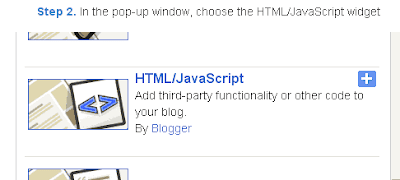
 step2 :


Blogger Tips And Tricks|Latest Tips For Bloggers


Step 3. Select 'HTML/Javascript' and the code given below.

Step 4. Now Click On Save and You are done.


  CURSOR CODE:

<style type="text/css">body, a:hover {cursor: url(SSS), progress !important;}</style><a href="http://www.cursors-4u.com/cursor/2010/03/12/blogger.html" target="_blank" title="Blogger"><img src="SSS" border="0" alt="Blogger" style="position:absolute; top: 0px; right: 0px;" /></a>
<div dir="ltr" style="text-align: left;" trbidi="on">
Best regards,<br />
<div style="padding-left: 10px;" width="400">
Mohammed saad sait<br />
<span style="font-size: smaller;">
href="http://www.funatfree.blogspot.in/" target="_blank">http://www.funatfree.blogspot.in</a></span></div>


step5 :
Now in the place of bolded red font  SSS in the code replace that with the  image of your cursor's link.


Best regards,

Wednesday, 15 May 2013

Study certificate format for CET 2015

Click here down to downloadby : .... "mss group of companies"MAIL US TO ADVERTISE HERE :mss.multiproductions@gmail.com DOWNLOAD STUDY CERTIFICATE FOR PRINT OUT IN WORD FORMATDownloaded times:

Saturday, 14 July 2012

Download Free Microsoft NET.Framework


Microsoft

                                                                                                               Click Here to DOWNLOAD 

   Click here :   AN IMPROVED OF THIS VERSI0N POST HERE

Version:4.5
Date Published:09-10-2012

File name:dotNetFx45_Full_setup.exe            
File size:982 KB

DETAILS :
The .NET Framework 4.5 is a highly compatible, in-place update to the .NET Framework 4. By using the .NET Framework 4.5 together with the C#, Visual Basic, or F# programming language, you can write Windows apps. The .NET Framework 4.5 includes significant language and framework enhancements for C#, Visual Basic, and F# (so that you can more easily write asynchronous code), the blending of control flow in synchronous code, a responsive UI, and web app scalability . The .NET Framework 4.5 adds substantial improvements to other functional areas such as ASP.NET, Managed Extensibility Framework, Windows Communication Foundation, Windows Workflow Foundation, and Windows Identity Foundation. The .NET Framework 4.5 delivers better performance, reliability, and security.

For more information about these and other features of the .NET Framework 4.5, see the .NET Framework Developer Center website.

Note: The .NET Framework 4.5 redistributable was updated on 10/9/2012 to correct an issue related to an improper timestamp on a digital certificate which causes the digital signature on files produced and signed by Microsoft to expire prematurely. We recommend customers that previously installed the .NET 4.5 redistributable package dated 8/16/2012 install this updated .NET 4.5 redistributable package. More information about the issue can be found Microsoft Security Advisory 2749655.

It is the express edition where you can alter anything , helpful for many software as databases like WORDPRESS  , MySQL

 SYSTEM REQUIREMENTS :

  Supported Operating System

Windows 7 Service Pack 1, Windows Server 2008 R2 SP1, Windows Server 2008 Service Pack 2, Windows Vista Service Pack 2
      • Windows Vista SP2 (x86 and x64)
      • Windows 7 SP1 (x86 and x64)
      • Windows Server 2008 R2 SP1 (x64)
      • Windows Server 2008 SP2 (x86 and x64)
    • Hardware Requirements:
      • 1 GHz or faster processor
      • 512 MB of RAM
      • 850 MB of available hard disk space (x86)
      • 2 GB hard drive (x64)

 INSTALLATION NOTE :

    Note: Windows 8 and Windows Server 2012 include the .NET Framework 4.5. Therefore, you don't have to install this software on those operating systems.   

    • On this page, choose the Download button.
      • To install the software now, choose the Run button.
      • To install the software later, choose the Save button. (When you install, the computer must be connected to the Internet.)


  • To download 

    Microsoft .NET 4.5 | One click offline package CLICK HERE...


                        mss - company of software

                        mss.multiproductions@gmail.com


                              Click Here to DOWNLOAD